
Review and decide
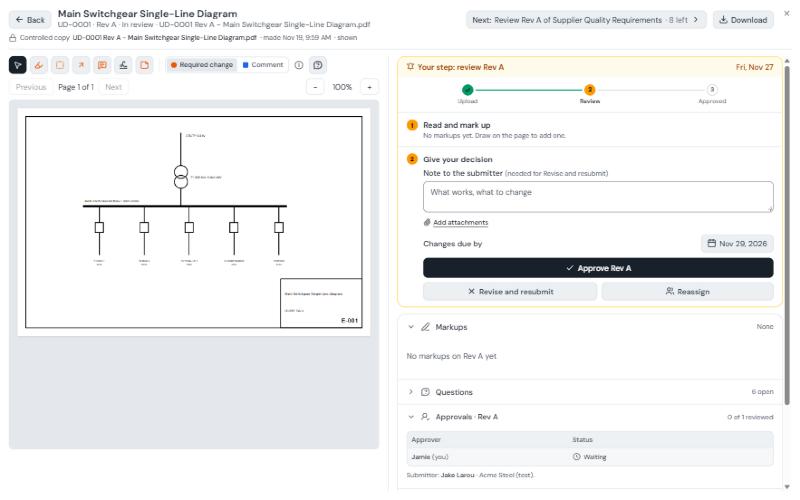
An approver reads the revision, marks it up, and gives one of two answers: approve it, or ask the submitter to revise and resubmit.
How it goes
- Approver: Open the review (From Home, or Open to review in the pane)
- Approver: Read and mark up (Required changes and comments, drawn on the page)
- Approver: Ask a question (When you need an answer before deciding) (optional)
- Approver: Give your decision (Approve, or Revise and resubmit)
- Docutrol: Recorded and passed on (To the next approver, or back to the submitter)
Step by step
- Press Review on the task. The document opens full screen with your step on the right.
- Choose Required change or Comment, pick a tool (box, highlight, arrow, call-out, text) and draw on the page. Type the note and save it.
- A required change must be dealt with in the next revision. A comment is advice only.
- When you have finished reading, give your decision: Approve, or Revise and resubmit. If you ask for changes with no markups, a note saying why is required.
- If your workspace uses e-signatures on this document, approving asks you to confirm it is you (your password, and sometimes an emailed code).
Good to know
- You can edit or delete your own markups until the revision is decided.
- Compare shows this revision beside the previous one, with what was added, removed and changed.
- Away? Set Out of office in the workspace menu and someone can review for you. Or use Assign to someone else on a single document.