
For project managers and project teams
Know where every document stands, and who has it.
Managing a project means chasing other people's approvals. Docutrol shows whose turn it is on every document, does the chasing for you, and reports what is late and who it is waiting on.
Less chasing
What a week of follow-up turns into.
Step 1
Set it up once
Request each document with its approvers and due date, one at a time or up to 500 from an Excel list. Docutrol numbers them and tells each person what is theirs.
Step 2
Let it chase
Reminders go out before and after each due date. When something stays late, the requester and admins are told, on the schedule you set.
Step 3
See what is stuck
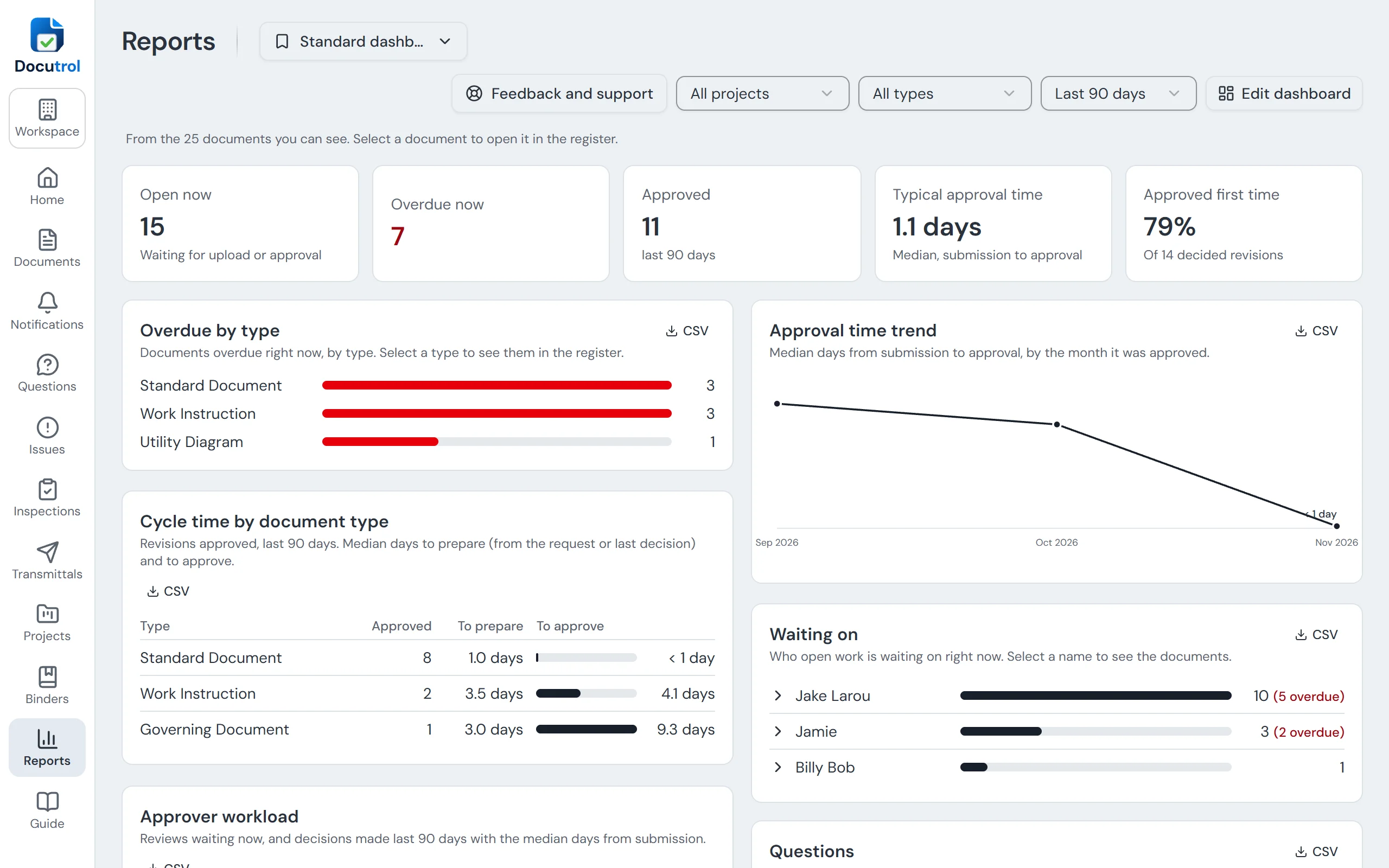
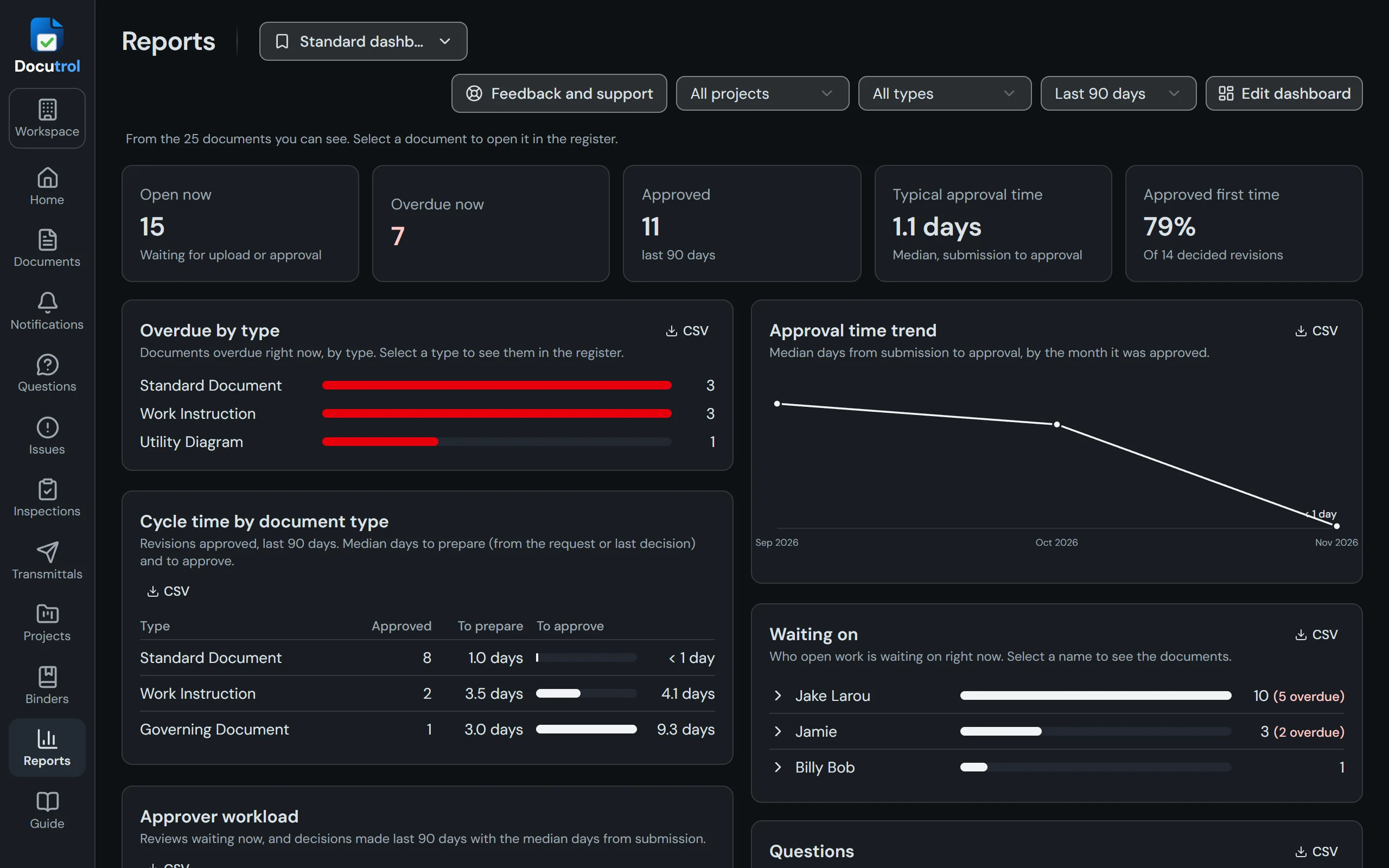
Every document shows who it is with and for how long. Late ones stand out, and the Waiting on report and the company view list what each person and each company is holding.
Step 4
Report without building a report
Approval time, the share approved first time, workload and overdue items are already on the dashboard. Export any of it to Excel or CSV.
What you get
The tools a project manager reaches for.
Whose turn it is
A "With" column on the register names who must act next and counts the days. Home gives each person their own list, late first, with one button per task.
Reminders and escalation
Before the due date, on the day, then while overdue, with escalation to the requester and admins and a daily summary instead of a flood of emails. (Team)
Projects
A home for each project's documents, binders and people. Each member sees their own tasks in it, and the project manager decides who can open what. (Business)
Outside companies
Clients, consultants and suppliers take part as free guests through private links. A company view shows what each one is holding and what is overdue. (Business)
Dashboards
Open, overdue, approved, typical approval time, cycle time by type, who work is waiting on and approver workload, filtered by project and period. (Team)
Your own tiles
Build a tile from documents, approvals or questions, grouped the way you report. Or describe the figure you want and let AI draft the tile for you to check. (Business)
Saved views and a board
Save any combination of filters, columns and sort as a view, share it with the team, and switch the list to a board by stage.
Spreadsheets and bulk work
Request documents from an Excel list, upload many files at once, and act on a selection in one step. (Team) Exporting the register to Excel is on every plan.
In the tools your team uses
Tasks appear in Microsoft To Do and attachments come straight from Outlook. Notices post to Teams or Slack (Team), and a Smartsheet sheet stays in step with the register (Business).
Any kind of project
Not only construction.
An equipment installation, a plant move, a product launch, a supplier qualification: any project with documents that several people have to produce, review and approve by a date. Document types, approval steps and custom fields are yours to set, so the register fits the project rather than the other way round.
- Each revision's file is fingerprinted, so the approved copy is the copy that was reviewed.
- The full history of every request, review and decision exports to PDF or CSV at closeout.
- Running a job site? Submittals, RFIs, drawing sets and transmittals are built in.
Questions from project managers
Does Docutrol replace our project management tool?
No. Docutrol has no schedules, budgets or Gantt charts. It controls the project's documents: who must produce, review and approve each one, by when, and which revision is in effect. Keep your planning tool and let Docutrol handle the documents alongside it.
Who can see a project's documents?
A person sees a document only if they have a part in it or it has been shared with them. The project manager shares documents with project members and guests at view, contribute or manage level (guests up to contribute). Workspace owners and workspace admins can open everything.
Do clients and suppliers need accounts, and do they cost anything?
No. Outside people are guests: they open private links from Docutrol's emails, see only the documents they are on, and are always free.
Which plan do we need?
Team ($15 per paid user a month, billed annually) has reminders, several approvers in order, dashboards, Excel import, and Teams or Slack notices. Excel export of the register is on every plan. Projects, the company view, custom and AI tiles and Smartsheet are in Business ($29). People who only read are free on every plan.