
Features
Everything between "please send it" and "this is the version in effect".
Switch on what your team uses. Everything else stays out of the way.
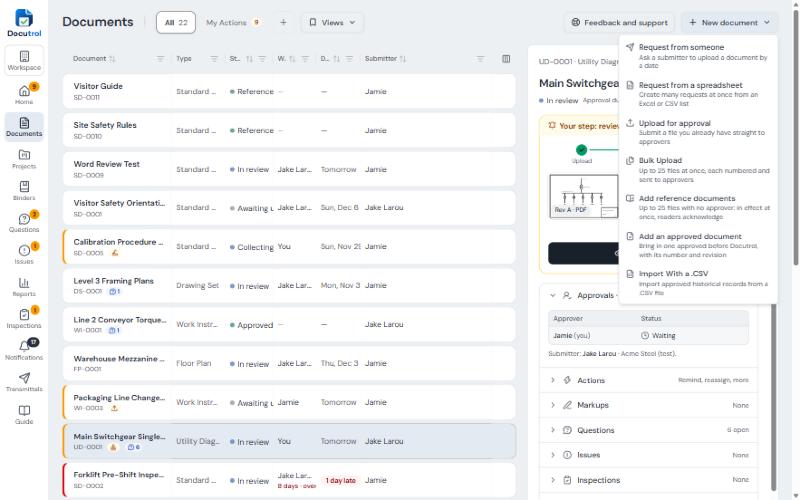
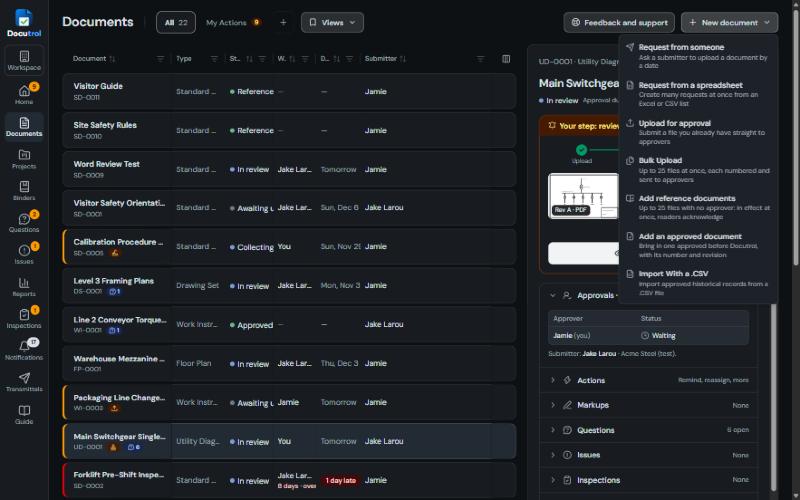
Request, submit and track
One register for every controlled document, with whose turn it is always visible.
Requests with a due date
Ask someone for a document, set who approves it and when it's due. Docutrol numbers it by type.
Home
Everything waiting on you, late first, each with one button. Tiles show what's waiting on others and how long approvals take.
The register
Filter, sort and save views, switch to a board, or export to Excel. Every row opens the document and its history.
Automatic reminders
Reminders before and after due dates, escalation to the requester, and a daily summary instead of a flood of emails. (Team)
Bring in what you have
Add documents that are already approved, keeping their numbers and revisions, one at a time or from a spreadsheet. (From a spreadsheet: Team)
Review and approve
Reviewers mark up the page itself, and approval is tied to the exact file they saw.
Markups on the page
Comments and required changes pinned to the spot, for PDFs, Word, Excel, PowerPoint and images.
Revise and resubmit
Submitters see each required change, answer it, and send the next revision. Compare any two revisions side by side.
Approval flows
Quick (one approver), Standard (several approvers, together or one after another) and Controlled (signed approvals with identity checks). (Several approvers: Team. Signed approvals: Business)
Reassign and out of office
Hand a review to someone else, or set a stand-in while you're away, with the history kept.
AI assist
Change summaries between revisions and checks against a type's approval checklist, by Anthropic's Claude. It advises; people decide. (Business)
Sign and release
Signatures with a meaning, and a released copy anyone can check.
E-signatures
Each approval is signed with a password or emailed code, a stated meaning and a time. (Business)
Signature fields
Place signature, initials and date fields on the page for approvers and other signers. Approvers fill theirs as they approve; other signers sign once it is approved. (Business)
Released copies
The effective revision is stamped and carries a certificate of approvals and signatures.
Public verification
Anyone can check a released copy on Docutrol's Verify page: if a byte has changed, it says so.
Read and acknowledge
Choose who must read each effective revision and see who has confirmed. (Team)
Construction and field work
For jobs as well as for the company's own documents.
Submittals
Reviewers answer Approved, Approved as noted, Revise and resubmit or Rejected, and the released copy carries a submittal review stamp. (Business)
Questions (RFIs) and issues
Ask a named person about a document and record the official answer; raise issues with photo proof. (Team)
Drawing sets
Multi-page drawing PDFs get a sheet index and show which sheets changed. (Business)
Transmittals
Send approved documents with a cover sheet and see who confirmed receipt. (Business)
Projects and inspections
Gather a job's documents and people; carry out signed checklists against an approved document or the checklist's own standard. (Business)
Outside people and connections
Work with the people and tools you already have.
Guests
Clients, engineers and subcontractors take part through private email links, free, and see only their documents.
Outlook and To Do
Send attachments to Docutrol from Outlook; see your Docutrol tasks in Microsoft To Do.
Cloud storage
Pick files from OneDrive, SharePoint or Google Drive and file approved copies back. (Business)
Slack, Teams and Smartsheet
Post notices to channels (Team); keep a Smartsheet sheet in step with the register (Business).
API, webhooks and Claude
Connect other systems, or ask Claude about your documents through Docutrol's Claude connector. (Business)
Security and records
The controls an auditor or IT team will ask about.
Enforced in the database
Who can see, approve and sign is checked on the server for every request, through the app, the API and every connection.
Fingerprinted files
Every revision's file is fingerprinted at upload and checked before approval.
Multi-factor authentication
For anyone who wants it; required for everyone, or Microsoft sign-in required, on Enterprise.
Audit trail
Every request, review, signature and change is recorded with who and when, and can be exported.
Retention and records
Keep rules per type, admin-approved disposal that keeps the record, and legal holds. (Enterprise)